WgPilot is a minimal GTK3 client that starts, restarts and stops a WireGuard tunnel from one small window.
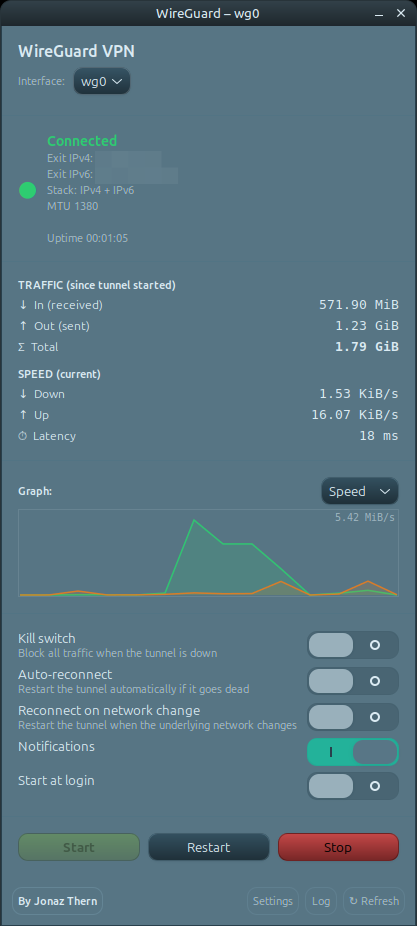
Live status, traffic / speed / latency graphs, a kill switch, a connection watchdog, reconnect-on-network-change and dual-stack public-IP reporting — in a single Python script that talks to wg-quick through pkexec.
What it does
One window, real numbers, and safety rails that keep your real IP off the wire when the link drops.
Start, Restart and Stop any WireGuard interface, with a picker for multiple tunnels.
Cumulative traffic, current up/down speed and round-trip latency, plotted live in the window.
An nftables rule blocks all traffic outside the tunnel, so your real IP never leaks if it drops.
Detects a tunnel that is up but dead and can reconnect it automatically in the background.
Restarts the tunnel when the underlying network changes — Wi-Fi to Ethernet, roaming, resume.
Reports your exit IPv4 and IPv6 so you can confirm the tunnel is actually carrying you.
Get started
Linux with a WireGuard tunnel already configured via wg-quick (e.g. /etc/wireguard/wg0.conf). WgPilot controls it — it never creates or edits your config.
# Debian / Ubuntu / Mint
sudo apt install ./wgpilot_1.2.0_all.deb
git clone https://github.com/TheJonaz/wgpilot.git
cd wgpilot
./install.sh
wgpilot -i wg0
# or from your app menu
Under the hood